See your family's schedule and your favorite photos — together on one screen.
⭐ The #1 Digital Calendar & Frame
❤️ Your family's schedule & photos, on one screen
🎁 The most meaningful gift for busy families
✨ No subscriptions — just real connection
Meet the LuvLink Digital Calendar — a beautiful frame that shows your family's real schedule and your favorite photos, together on the wall. It syncs the calendars you already use, so one glance replaces the endless "Mom, when's soccer?" A photo frame when you want it. A calendar when you need it.
Why families love it
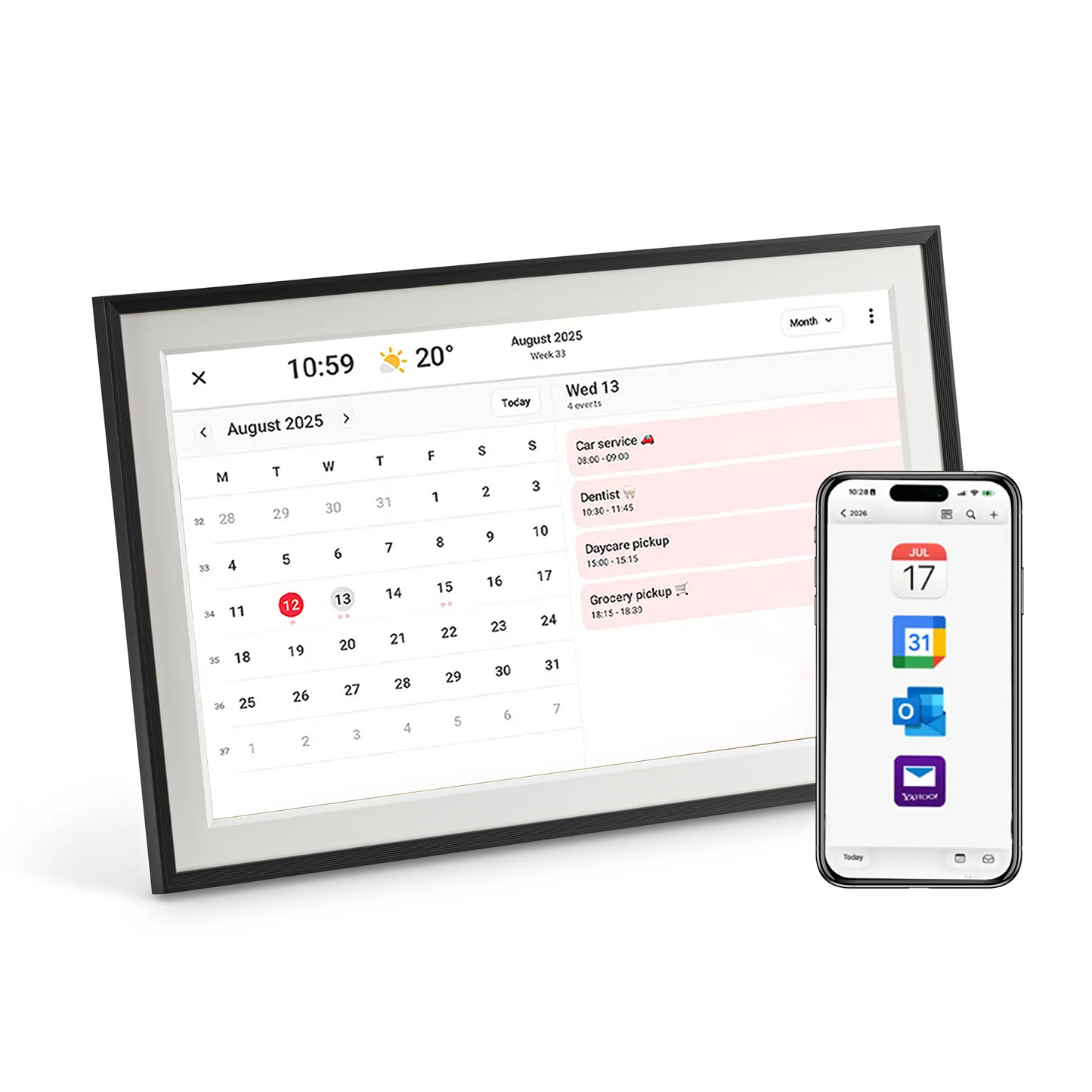
Auto-syncs your real calendar 📅 Google, Apple/iCloud, Outlook & Yahoo, updated in real time over Wi-Fi.
One shared family calendar 🏡 Everyone sees the week at a glance — fewer clashes and forgotten pickups.
Best of both worlds 🖼️ A hybrid view shows your photos and your plans side by side.
Countdowns & reminders 🔔 For birthdays, holidays and trips.
Color-code your calendars 🎨 So everyone's plans are easy to tell apart.
US-based support 🇺🇸 Fast, free US shipping and a 12-month warranty.
Powered by Frameo
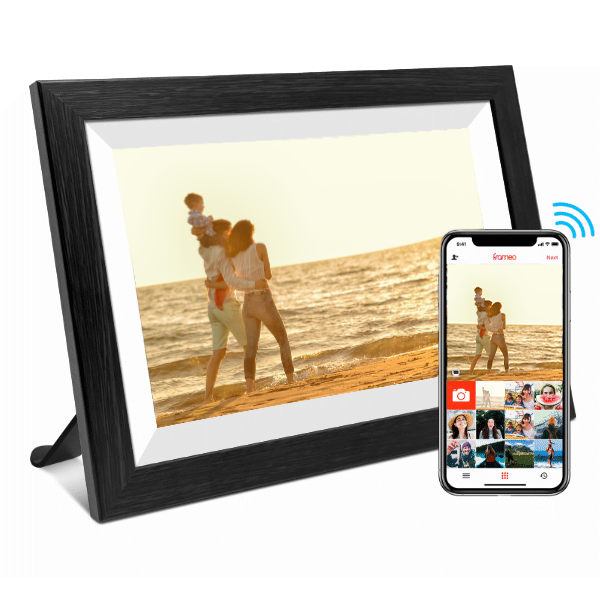
The LuvLink Digital Calendar runs on Frameo — the world's most popular digital frame software, featured in Forbes, TechRadar and People. Set up in minutes with the free app (iPhone & Android), enjoy 32GB of storage, support for 22+ languages, offline mode and full privacy compliance. No social media, no account and no subscription needed to get started — just plug in, sync and go.
Available in 10.1" and 15.6" and a range of styles, with fast, free US shipping and a 30-day money-back guarantee.
Product Details & Specs
Resolution: 1280 x 800
Screen size: 10.1" LCD Touch Screen
Storage: 32GB
Power: DC Power Supply
WiFi: 802.11 b/g/n
Weight: 2.2 pounds
Dimensions: 14" x 8"
Ports: Micro USB, Micro SD, DC Power
Product Features
Send photos direct from your mobile phone via the Frameo App
Photos appear automatically in a slideshow.
The entire family & friends can send photos.
Connect to as many phones as you wish.
Send personal messages with photos.
Supports up to 22 languages.
Very easy to set up. Only takes a few minutes.
Connects to the internet using WiFi.
32GB internal storage, store thousands of photos & videos
Warranty
All LuvLink products come with 12-month warranty.
Our dedicated support team is here to help you at any time.
Shipping & Returns
3-5 day delivery within the US. We also ship worldwide.
We offer a satisfaction 30-day money back guarantee for all LuvLink products.
📦Free shippingfast US shippingFree shippingUS shipping
⭐4.9/5from 3,400+ reviews4.9/53,400+ reviews
·
💜100K+families connected100K+families
·
🌍150+countries150+countries
·
📦Free shippingfast US shippingFree shippingUS shipping
⭐4.9/5from 3,400+ reviews4.9/53,400+ reviews
·
💜100K+families connected100K+families
·
🌍150+countries150+countries
·
📦Free shippingfast US shippingFree shippingUS shipping
✨ NEW — NOW WITH CALENDAR
Digital Photo Frame and Calendar
Your LuvLink frame now syncs with your calendar — while still being a beautiful digital photo frame. Your family's plans and your favorite people, together on one screen.
“Such a great way to keep in touch with family and friends”
— Stuart C., verified buyer
ONE GLANCE. THE WHOLE WEEK.
The Digital Calendar Families Across America Love
The LuvLink Digital Calendar puts your family's real schedule and your favorite photos on the wall — together. It syncs the calendars you already use and updates the moment plans change, so everyone's on the same page. A photo frame when you want it, a calendar when you need it.
Loved by families. Powered by Frameo.
📅
Your real calendar, on the wallAuto-syncs Google, Apple, Outlook & Yahoo over Wi-Fi and updates in real time, so the whole family sees the week at a glance.
🏡
One shared family calendarEveryone's plans in one place the whole house walks past. Kids and grandparents can check it themselves
🖼️
Photos and plans, togetherA hybrid view keeps your favorite memories sliding by right alongside today's schedule. Beautiful and useful at once.
🔔
Never miss the moments that matterCountdowns for birthdays, holidays and trips keep the big days in view.
🔄
Change a plan, it's on the frameEdit an event on your phone and the wall updates instantly. No re-typing, no nagging.
👵
Simple for every ageA big, clear display and effortless setup. If they can read a wall calendar, they can use this.
⭐ Loved by families across the US
THE BEST OF BOTH WORLDS
A calendar you'll actually use — and love looking at
The LuvLink Digital Calendar brings your schedule and your memories into one frame, all managed from the simple, free Frameo app.
📆
Auto-synced calendarConnect Google, Apple, Outlook or Yahoo once and your events appear automatically, always up to date.
🖼️
Hybrid viewSee your daily plans alongside your photo slideshow, so your memories keep flowing while you stay on track.
🔔
Countdowns & remindersHighlight birthdays, holidays and trips so the days that matter are never missed.
🔒
Private by designFrameo never stores your calendar data. Your schedule stays yours.
📸
Still a brilliant photo frameSend photos and videos straight to the frame from anywhere, with a message to match.
🎨
Color-code your calendarsGive each person or calendar its own color, so everyone's plans are easy to tell apart at a glance.
SEE YOUR WEEK, YOUR WAY
Choose your view
Six ways to see your day — from a full month at a glance to your photos and plans side by side. Switch with a tap, and it auto-rotates portrait or landscape, whether it's on a wall or a shelf.
🗓️
Weekly viewSee the whole week at a glance — perfect for planning together.
›
📅
4-day viewZoom in on the next few days and what's coming up.
›
📆
Monthly viewThe big picture: every event and important date in one view.
›
🖼️
Hybrid viewYour photos and your schedule, side by side on a single screen.
›
🔔
Event viewTap any event for the full details — time, location, and notes.
›
🎞️
Photos-onlyHide the calendar and enjoy a full-screen photo slideshow.
›
MORE ABOUT THE CALENDAR
How the Frameo Calendar works
Everything syncs from the calendar you already use — no new app to learn, no double entry.
📥
Events sync automatically
Every event from the calendar you already use appears on the frame and updates in real time. Tap one to see the time, place and notes.
🔄
Auto-rotates
Portrait or landscape, the calendar rotates to suit — with wall-mount and table-stand built in.
🎨
Color-code events
Give each person or calendar its own color, so everyone's plans are easy to tell apart at a glance.
LuvLink Digital Calendar
The plans that get lost — now everyone sees them.
A calendar on the wall the whole family walks past. Less mental load for you. Fewer missed moments for everyone.
📅
Everyday plans
School runs, shifts, appointments — the week's schedule, always in view.
🤝
Everyone in sync
One shared calendar means fewer clashes, double-bookings and forgotten pickups.
🎉
Big moments
Birthdays, holidays and trips counted down so nothing important sneaks up on you.
❤️
And your photos too
In between the plans, your favorite people glow past on the slideshow.
POWERED BY FRAMEO
Organized in three simple steps
Sync the calendar you already use and see your whole week on the wall — no tech skills required 💛
01
Sync your calendar
In the free Frameo app, choose Google, Apple, Outlook or Yahoo and follow the quick guide.
02
Tap 'Allow' on the frame
A quick tap on the frame keeps you in control of what's shown. Then it syncs automatically.
03
You're organized
Your week appears on the wall and updates in real time whenever plans change. That's it.
AND A BEAUTIFUL PHOTO FRAME, TOO
More ways to stay close
When it's not showing your week, the LuvLink Digital Calendar is a gorgeous photo frame — sharing life's moments with the people you love, wherever they are.
📅
Calendar built right inSync your calendar and show your week alongside your photos — organised and connected in one frame.
›
🖼️
Display more with collage modeShow up to 6 photos at once — perfect for sharing more memories in a single glance.
›
😍
React in real timeSend a quick emoji reaction to any photo straight from the frame. A simple 'thinking of you' in seconds.
›
📸
Send photos & videos instantlySend moments straight to the frame from anywhere in the world. Add a message to make it personal.
›
📁
Organize with albumsCreate albums for every occasion and switch between them anytime. Simple and flexible.
›
Features
Everything you need
🔄 Always the perfect view
Auto-rotates portrait or landscape, so your calendar and photos always look their best — on a wall or a shelf.
🌈 Bright, vivid display
A crisp IPS screen with wide viewing angles — your week and your memories stay clear and vibrant from across the room.
⚡ Set up in minutes
Sync your calendar and start sharing photos in minutes. Connect once and you're organized.
📶 Powered by Frameo
Runs on Frameo — the world's most popular frame app. Calendar sync and photo sharing, with no subscriptions or fees, ever.
🇺🇸 Fast, free US shipping
Shipped quickly from within the US, with support in your time zone.
💛 30-day happiness guarantee
Love it or send it back within 30 days — no stress.
Feel confident. Stay connected.
Why Choose the LuvLink® Digital Calendar?
We create meaningful ways to stay connected and organized, backed by trusted quality, US-based support, and thousands of happy customers nationwide.
⭐
Trusted by 100,000+ familiesJoin families sharing moments every day, with thousands of five-star reviews.
🇦🇺
US-based supportReal people ready to help, right here in the States.
🚚
Fast, free US shippingQuick dispatch and reliable delivery nationwide.
🛡️
Risk-freeA 30-Day Money-Back Guarantee and 12-Month Warranty for total peace of mind.
🏆
A favorite connected giftAward-winning designs trusted for simplicity, reliability, and real connection.
Customer reviews
Customer Reviews
Overall rating: 4.9 / 5 from 789 reviews.
Absolutely — here’s a polished version that keeps that warm, genuine feeling:
I was sick and tired of having all my favourite photos stuck on my phone, never really getting to enjoy them. This frame has changed that! ❤️ Now I get to see all those beautiful memories every single day, and everyone who sees it absolutely loves it. It’s such a beautiful way to bring our memories to life and have them on display instead of hidden away in my camera roll. 🥰📸❤️
Just loving being able to transfer photos from my phone. This frame is a gift for my mother who is turning 90 and lives 400km away . I’ve loaded a heap of family photos and I know she will be estatic being able to see her family. And the great thing is that my daughter in laws can send photos direct to her Frameo! I bought the 15.2 inch one and now I want one! Wonderful to see the photos that have stayed tucked away!
This digital frame ticks all the boxes! Easy to set up, connected through your phone app, touch screen and great value! I will order more for grandparents for Xmas gifts!
I bought two frames; one for our house and one for my parents as a thank you gift. They were very easy to set up and sending photos to them is a breeze in the app. My only wish is when I have the collage setting on I could pick single photos to display on their own among the collage. Otherwise I love it. It's so nice to get photos that have never been displayed off of the cloud and into my home.
A beautiful way to stay connected
We absolutely love our LuvLink photo frame! It’s so easy to use and makes sharing special family moments so simple. Being able to send photos straight to the frame is such a lovely way to stay connected, especially with family who aren’t nearby. The photo quality is great, and it’s become a really special addition to our home. Highly recommend!
I bought the frame after I lost my beloved dog, Stella and filled it with my favourite photos of her. The photo doesn't do it justice, it's such a wonderful keepsake and I'd recommend to anyone looking for a digital photo frame. Thank you.
Pictures look great on the frame, plenty of settings for the frame, time, date, weather, sleep mode, calendar. Captions are great so our elderly parents have more understanding of what the pic they are looking at was from. Very impressed.
We loved ours so much, we bought our daughter and grandson one each for there birthdays.
So looking forward to sharing all our photos of our new gt grandaughter.
Beautiful. Great seeing all the flashbacks you've forgotten about. A visiting grandparent loved it so much they wanted one too. The 15' size is perfect, great how you can edit the orientation of the photos to fit the frame so they're displayed optimally.
Love the frame for grandparentals and sharing family photos! The photos really shine. The screen turns off overnight which is an unexpected bonus. Highly recommend
Arrived within a few days. Easy to set up and share. We bought it for my Mum’s 90th. She will love seeing rolling old and new photos. I will purchase again.
Our family loves ❤️ the Luvlink because we share photos and highlights of our lives between 3 households. This is my daughter scuba diving. We get to share special moments and each other's adventures ✨️ 💕 right in our living rooms.
Efficient service kept me informed from purchase to delivery. Wonderful mother's day gift. Family all around the world can send photos. My 86 year old mum absolutely loves the digital frame seeing photos of her kids, grand kids and great grandkids.
It's my favourite thing to look at in my open family living room. I love re-living precious memories and seeing many different times over the years. It's a treasured gift. It keeps me connected to my friends and family. I have upgraded from 7 inch frame to 15 inch frame. Kids also like to flick through the pics.
I always loved it, but was very frustrated that it would wake up in the mornings, but after some information from the help people and an update was done it seems fine now
Got it for the wife for Mother’s Day. Just uploaded some test images. We love it -
only issue is the limit of 10 photos unless take out a subscription, thankfully that’s not expensive but still a bit of a drag
We bought this for my Mum for Mother’s Day. We absolutely love it. Setup is quick & easy. It was fun playing around with the setup & deciding what photos to add for her when we gift it to her. She doesn’t have the frame just yet but I know she will love it!
Such a special gift
Great Purchase - Sadly our Dog of 15 years passed away and we couldn’t pick just one photo to get framed so this was the best option - very easy to add photos onto the frame. Videos can only be added in 10 second snippets unless you pay a subscription fee.
Ideal way of showing family photos. Good bright resolution and easily customised if necessary. Short videos look great as well.
Made an excellent gift for Grandma.
I love my LuvLink digital photo frame.
It is very easy to use and I can’t believe how many photos I have been able to put in and I’m still going!
It has been so great to see photos from all generations on the slideshow pop up I our kitchen instead of locked away on the hard drive. I’m so glad I got this and have got one for my mum interstate. The clarity of the screen is terrific.
Find our frequently asked questions about the Connected Photo Frame below. If you have any additional questions then please contact our friendly support team.
Which calendars can I sync?
Google, Apple, Outlook, and Yahoo. Connect once in the free Frameo app and your events appear on the frame automatically.
Can I still see my photos?
Absolutely. It's a full digital photo frame too — switch to a photos-only slideshow, or a hybrid view that shows your photos and schedule side by side.
Are there any ongoing costs?
None. No subscriptions and no monthly fees — the Frameo app is free.
Is it hard to set up?
Not at all. Sync your calendar in the app, tap 'Allow' on the frame, and you're done — most families are set up in minutes.
How does the family see the calendar?
It lives on the wall or a shelf, so everyone walks past it and sees the week at a glance — no app needed just to look.
Can I use it landscape or portrait?
Yes — it auto-rotates, so your calendar and photos always look right either way.
Does Frameo see my calendar or schedule?
No. Frameo doesn't store your calendar data — your schedule stays private to you.
How much storage does it have?
32GB of built-in storage — plenty for thousands of photos and short videos.
How do I set up the calendar?
In the free Frameo app, choose your provider (Google, Apple, Outlook or Yahoo) and follow the quick guide. Then tap 'Allow' on the frame.
Can more than one person add events?
Yes — anyone who shares the connected calendar can add events from their own phone, and the frame updates in real time.
Does it need Wi-Fi?
Wi-Fi is needed to sync your calendar and receive new photos. Your existing photos keep playing even if the Wi-Fi drops.
Can I wall-mount it?
Yes — it's ready for both wall-mounting and a table stand.
What's the difference between this and the photo frame?
It's the same beautiful device — the Digital Calendar simply adds calendar sync on top of everything the photo frame does.
Can I color-code the calendar?
Yes — give each person or calendar its own color so everyone's plans are easy to tell apart at a glance.
Does it run on batteries?
It's mains-powered — plug it in and it stays on and up to date.
Can I show reminders, chores or to-dos?
It displays events and countdowns from your synced calendar. For chores or to-dos, add them as calendar events and they'll appear too.